
Everything you need to settle into The George — keys, codes, WiFi, payment setup, and the small stuff that makes the first week easier. Save this page; you’ll reference it more than you think.
You’ll get everything you need to access your home and the community at check-in. Confirm each item before leaving the front desk — and don’t initial anything you didn’t actually receive.
Unlocks your apartment's main entry from the exterior.
Privacy lock for your individual bedroom inside the unit.
Issued once your Unit Condition Form is submitted to the office.
Required for pool access. Bring one for yourself, two for guests.
Use this code to enter the clubhouse anytime it’s open to residents — coffee bar, lounge, study spaces, and more.
1920#
Update your address with the bank, your school, your subscriptions, and your mom. Here’s exactly how to format it and where to find your deliveries.
Use this format any time you need to ship something to The George:
First & Last Name
100 Woodland Drive #Apt
Statesboro, GA 30458
USPS mail is delivered to the mailboxes located in front of the clubhouse. Your mailbox key works only on the box matching your unit number.
Heads up: oversized packages held at the office will be released during regular office hours only.
Six things to knock out in your first 48 hours. None of them take long, but missing one (especially the Unit Condition Form) can cause problems later.
Required for all residents. You’ll be auto-enrolled in the Resident Liability Insurance Program at $12.99/month unless you provide a declaration page from your own carrier that meets our minimum requirements.
Every resident registers a profile — even if you don’t have a pet. We’re a pet-friendly community, and pet registration must be completed before you move in.
Take ten minutes with the welcome packet you receive at check-in. It covers payments, what to bring, emergency numbers, and the small details that answer most “wait, where do I…” questions.
A link will be sent to your Resident Portal. Walk through your apartment and document every existing issue — paint scratches, stained carpet, wall damage, floor scratches. Photos help. Skipping this means you could be charged for damage that was already there.
Maintenance staff are on-site. Submit non-urgent work orders through the Resident Portal. For emergencies (electrical, water, HVAC failure), submit the request and call the office immediately.
Rent posts on the 1st of every month. You have a 3-day grace period — late fees start at noon on the 4th. Set up auto-pay in the Resident Portal so you never have to think about it again.
Update your address with the bank, your school, your subscriptions, and your mom. Here’s exactly how to format it and where to find your deliveries.
appletree
(866) 559-4223
The Resident Portal is mission control — pay rent, submit maintenance requests, check announcements, and manage your account. Use whichever option fits your day.
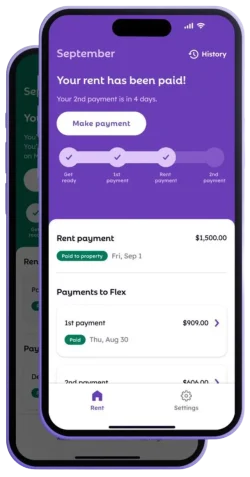
Rent is due on the 1st with a 3-day grace period before late fees start. Want to split your monthly payment in two? Flex is built for that.
Flex partners directly with The George to break your monthly rent into two smaller payments — so cash flow doesn’t have to revolve around the 1st of the month. Sign up by 5pm ET on the 4th to use Flex for that month’s rent.
Smaller monthly payments
Rent paid on time, in full
Build credit history
Bringing a car? Stop by the front office to fill out a parking permit application before you park overnight and parking passes will be included with their move in packet & keys. Vehicles without a valid decal are subject to towing at the owner’s expense.
Display your decal on the lower driver’s-side corner of your windshield. If it’s not visible, your car may be towed.
Visitors: Stop by the office to grab a temporary visitor pass before parking on-site.
Nothing crazy — just the things that keep The George a place everyone wants to live in.
Pet waste stations and bags are placed throughout the property. Pick up after your pup, every time.
Dumpsters are located throughout the community. Take trash inside the dumpster — no curbside drops.
Be a good neighbor after 10pm. Keep noise reasonable so everyone can study, sleep, or both.
Propping community doors compromises everyone's safety. Keep entrances secure at all times.
The questions we get most often during move-in week. Don’t see yours? Stop by the office or message us through the Resident Portal.
Rent posts on the 1st of every month. You have a 3-day grace period — late fees begin at noon on the 4th. Submitting a payment a day or two early is totally fine and avoids any surprises.
Submit a maintenance request through the Resident Portal and notify the office immediately. Emergencies — water leaks, electrical issues, no heat or AC — get prioritized over standard work orders.
Yes. Every resident is required to register a Pet Screening profile, even if you’re pet-free. It only takes a minute and is required before move-in.
Most Amazon orders are delivered to the on-site Amazon Hub. Oversized items that don’t fit in the Hub are delivered to the front office and held there for pickup during regular hours.
Sign in to the Resident Portal (desktop or mobile app), tap the Payments tab, and either set up a recurring payment or submit a one-time payment. You can also enroll in Flex to split rent into two installments each month.
Stop by the front office as soon as possible. We’ll get you a replacement and walk you through any associated fees. Don’t initial any keys at move-in that you didn’t actually receive — that’s how disputes start.
The Move-In Packet you receive at check-in lists all relevant emergency contacts. For life-safety emergencies, always call 911 first. The leasing office number is listed below in the Office Information section.
The leasing office is your first stop for anything that can’t be solved online. Walk in, call, or message us through the Resident Portal.
Use this code to enter the clubhouse anytime it’s open to residents — coffee bar, lounge, study spaces, and more.
Mon–Fri · 9:00am – 6:00pm
Saturday · 10:00am – 5:00pm
Sunday · 1:00pm – 5:00pm